
7) Batch Processing Functions
- Tweet
The MBC CMDB can perform robust batch processing tasks with just a few clicks.
Batch Processing Key Features
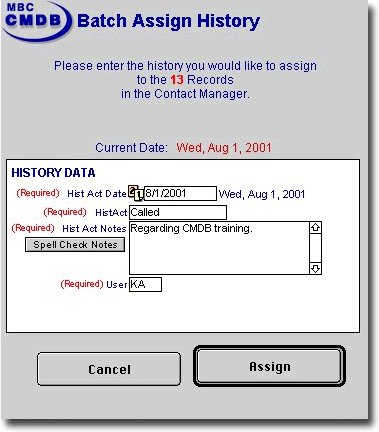
Batch Assign History
- Assign a past activity to a group of contacts.
- Example: Find all existing customers and insert in their history that you mailed them the brochure on the new widget.
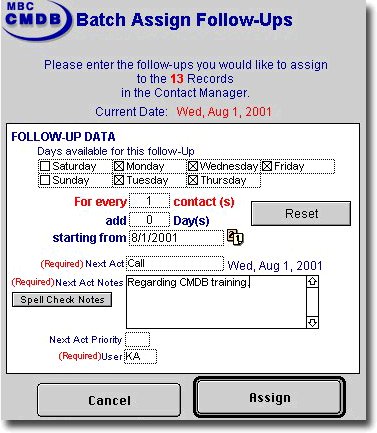
Batch Assign Follow-Ups
- Assign a follow-up to a group of contacts.
- Example: Find all existing customers and create a new follow-up to call and discuss the brochure/widget mailer (includes feature for available days and number of contacts per day).
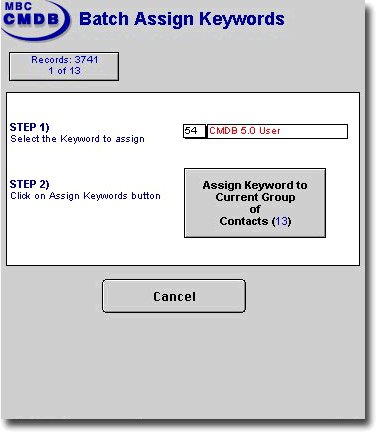
Batch Assign Keywords
- Assign a keyword to a group of contacts.
- Example: Find all existing gadget customers and assign a keyword to make them a widget prosepct.
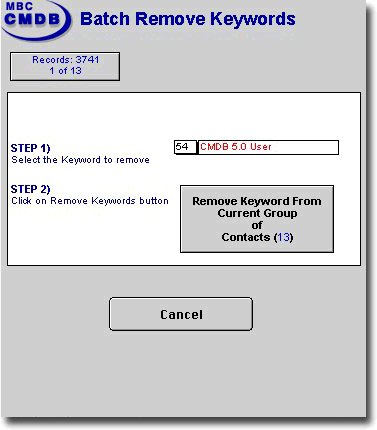
b>Batch Remove Keywords
- Remove a keyword from a group of contacts.
- Example: Find all the widget prospects and remove widget prospect from their keyword set.
Back to the top
ref no:4542
Please send questions about this website to webmaster
Copyright© 1996 - 2023 MacBusiness Consulting. All rights reserved.
Terms of Use / Legal Disclaimer / Privacy Statement
Site Designed and Managed by MacBusiness Consulting
Terms of Use / Legal Disclaimer / Privacy Statement
Site Designed and Managed by MacBusiness Consulting