
4) Keyword System
- Tweet
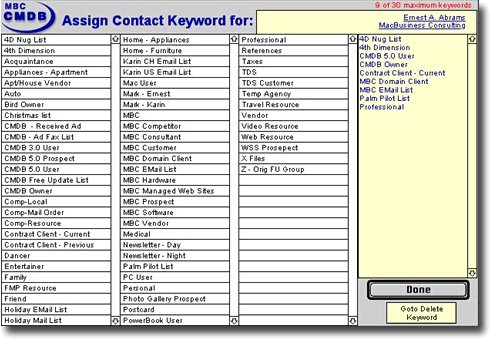
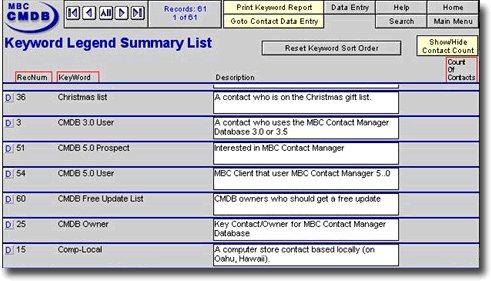
The MBC Contact Manager Database comes with a robust Keyword Management System that makes managing groups of contacts super easy. View screen shots below.
Keyword System Key Features
- Assign or remove keywords by just clicking on the keyword.
- Unlimited number of keywords in the Keyword Legend file.
- Create and edit your own keywords.
- Edited keywords automatically update related contact records.
- Contact count feature will quickly allow you to view a count of the number contacts for each keyword.
- Batch assign keywords to a group of contacts (see batch processing).
- Batch remove keywords from a group of contacts (see batch processing).
- Dynamic search of keywords from Contact, History, Follow-Up and Events file from a simple pop-up menu.
- Extensive validation system to ensure the integrity of the keyword data.
- NOTE: Limit of 30 keywords per contact. We have yet to run into a client that needs more keywords per contact, but it is possible. Additional MBC programming will be required to increase the contact keyword limit.
Back to the top
ref no:4549
Please send questions about this website to webmaster
Copyright© 1996 - 2023 MacBusiness Consulting. All rights reserved.
Terms of Use / Legal Disclaimer / Privacy Statement
Site Designed and Managed by MacBusiness Consulting
Terms of Use / Legal Disclaimer / Privacy Statement
Site Designed and Managed by MacBusiness Consulting